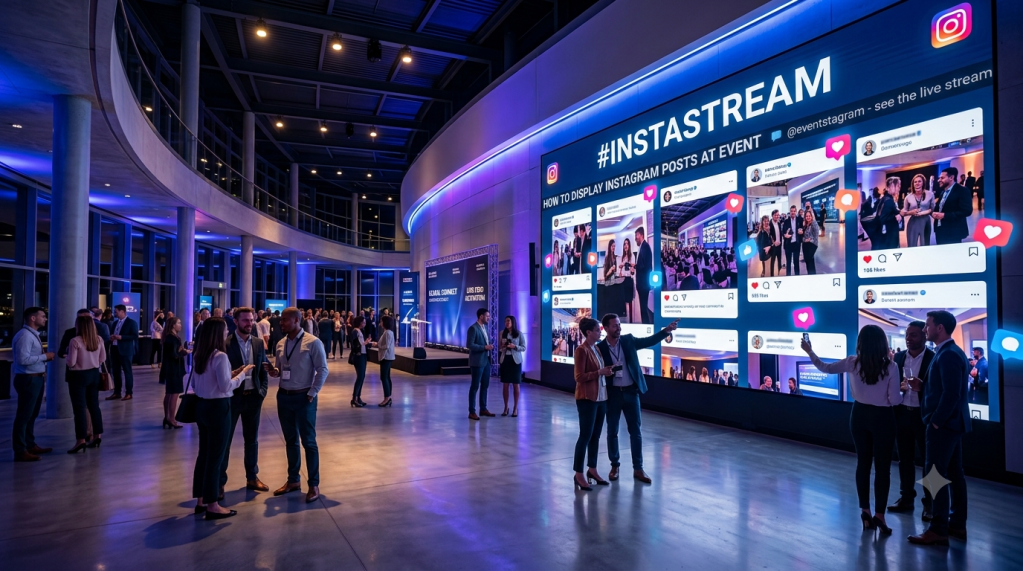
Instagram is often one of the easiest ways for attendees to share photos, videos, and experiences during an event. Instead of letting those posts stay only on individual phones, event organizers can bring selected Instagram content onto venue screens and create a shared visual experience.
Whether you are hosting a conference, wedding, trade show, festival, college event, or corporate gathering, displaying Instagram content can help attendees see what others are sharing and encourage more participation.
Why Display Instagram Posts at an Event?
Events generate a constant stream of social content. Attendees may share photos of the venue, speakers, activities, products, performances, or memorable moments throughout the day.
Displaying this content on a large screen gives those posts a wider audience. It can also make social media activity feel like part of the event rather than something happening separately on attendees’ phones.
A live feed can also encourage guests to participate. When people see other attendees’ posts appearing on venue screens, they may be more likely to share their own experiences using the event hashtag or account mention.
This approach is becoming a useful part of social media display at events, particularly where organizers want to connect online activity with the physical event experience.
1. Create an Event-Specific Instagram Hashtag
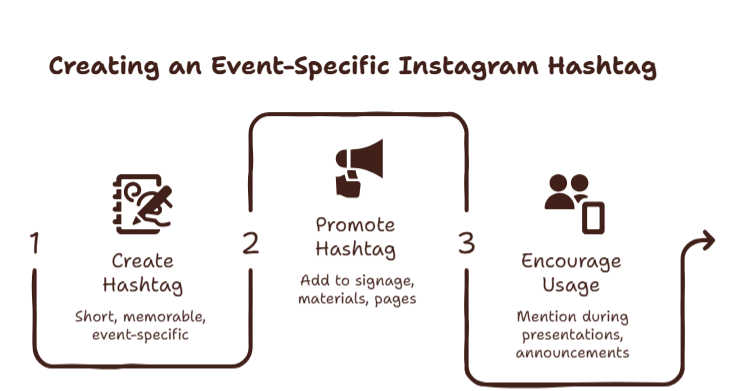
One of the simplest ways to collect relevant Instagram content is to create a unique hashtag for your event.
For example, a conference could use a hashtag based on its event name and year. Attendees can add that hashtag when publishing photos, Reels, or other eligible content.
Before the event begins:
- Create a short and memorable hashtag.
- Add it to event signage and promotional materials.
- Include it on registration pages and invitations.
- Mention it during presentations or announcements.
- Encourage attendees to use it when sharing event moments.
A unique hashtag makes it easier to identify posts related to your event instead of mixing them with unrelated content.
2. Connect Instagram to a Social Media Display Tool
If you want to show content automatically, you can connect an Instagram account, hashtag, or other supported source to a social media display platform like Social Walls by Taggbox.
The platform collects the selected content and organizes it into a feed that can be displayed on a TV, LED screen, projector, video wall, or other digital display.
This is more practical than manually downloading and adding every Instagram post to a presentation. Depending on the tool, you can also moderate content before it appears publicly.
3. Display Instagram Posts at Event Screens
Once Instagram is connected, you can choose where the content should appear.
For example, you might display Instagram posts at event screens placed around the main venue. A large display near the entrance can introduce attendees to the social feed, while screens around networking areas can keep the content visible throughout the event.
You can also adjust the layout so that posts, images, usernames, captions, and other relevant information are easy to see from a distance.
4. Show Instagram Posts in Real Time
Real-time content can make the display feel more connected to what is happening at the event.
As attendees share photos or videos, selected posts can appear in the feed. This can be especially useful during live events because the content changes throughout the day.
If you want to show Instagram posts at event venues, consider displaying the feed in areas where attendees naturally gather, such as networking zones, waiting areas, lounges, registration spaces, or near the main stage.
5. Show the Instagram Feed During Presentations
An Instagram feed does not have to run only between sessions. It can also be incorporated into the wider event program.
For example, organizers can show Instagram feed at event breaks, networking sessions, award ceremonies, or other moments when the main presentation screen is not being used.
This provides a way to keep the screen active while also giving attendees another reason to participate on social media.
6. Moderate Posts Before They Appear
Not every post associated with an event should automatically appear on a public screen.
Moderation is therefore an important part of running a live Instagram display. Organizers should be able to review incoming content and decide what should be shown.
Useful moderation options may include:
- Approving posts manually
- Removing inappropriate content
- Filtering specific words
- Selecting relevant posts
- Blocking unwanted content
- Reviewing posts before publication
Moderation helps keep the feed relevant and suitable for the event audience.
7. Customize the Display
A live Instagram feed should fit naturally into the event environment.
Depending on the display tool, you may be able to customize elements such as:
- Layout
- Background
- Fonts
- Colors
- Post arrangement
- Branding
- Display frequency
- Content filters
For example, a corporate conference might use a clean branded layout, while a wedding or festival could use a more visual design.
The goal is to make the Instagram content easy to recognize while ensuring it does not distract from the rest of the event.
8. Display Instagram Content on Different Screens
Instagram content can be displayed on many types of digital screens, depending on the event setup.
Common options include:
- TVs
- LED walls
- Projectors
- Video walls
- Digital signage screens
- Event kiosks
- Stage displays
This makes it possible to use the same social content in different areas of a venue.
For larger venues, organizers can also use multiple screens to make the feed visible to more attendees.
9. Use Instagram Content to Encourage Participation
A live Instagram display works best when attendees know how to contribute to it.
You can add simple instructions around the venue, such as:
“Share your event moments using #YourEventHashtag.”
You can also display the hashtag on the screen itself. This makes the participation process easier to understand and reminds attendees that their content may become part of the event display.
For events with a strong social media strategy, this can help generate more user-created content throughout the event.
10. Use a Social Wall for a More Interactive Display
A social wall can bring Instagram posts together with content from other sources. Instead of limiting the display to one social network, organizers can potentially combine content from multiple supported platforms.
This can be useful when an event audience is active across Instagram, Facebook, X, LinkedIn, TikTok, or other channels.
Social Walls by Taggbox is one example of a platform designed to collect, moderate, customize, and display social media content on event screens. It can be used when organizers want to turn attendee-generated content into a live event feed rather than managing individual posts manually.
Best Practices for Displaying Instagram Posts at Events
For the best results, keep the display useful and easy to follow.

Use a clear hashtag
A short event hashtag is easier for attendees to remember and type correctly.
Moderate content
Always review your content settings and moderation process before displaying posts publicly.
Choose the right screen location
Place screens where attendees have enough time and space to look at them without blocking important event areas.
Keep the design readable
Avoid overly complicated layouts. Attendees should be able to understand the content from a reasonable distance.
Test before the event
Check the Instagram connection, screen output, internet connection, layout, and moderation settings before guests arrive.
Keep content relevant
A focused feed containing event-related posts is more useful than displaying every piece of content associated with a broad hashtag.
Final Thoughts
Displaying Instagram content at an event can turn attendee posts into part of the live event experience. With a dedicated hashtag, a suitable display, content moderation, and an automated feed, organizers can showcase relevant photos and videos without manually updating screens throughout the event.
The key is to keep the content relevant, the display readable, and the participation process simple. When these elements work together, Instagram can become more than a social channel—it can become a live source of event content.
Frequently Asked Questions
Can I display Instagram posts on a screen at an event?
Yes. You can connect an Instagram source to a social media display platform and show selected content on TVs, LED walls, projectors, or other event screens.
How do I display Instagram posts on screen at event venues?
To display Instagram posts on screen at event venues, connect your Instagram content to a compatible display tool, configure the feed, customize the layout, moderate content, and connect the output to your event screen.
Can I display an Instagram feed without manually updating the screen?
Yes. A connected feed can automatically update as new eligible Instagram content becomes available, depending on the platform and Instagram integration being used.
What is the difference between an Instagram feed and a social wall?
An Instagram feed focuses on Instagram content, while a social wall can combine content from multiple social platforms and other sources into one display.
Can I use Instagram content at conferences and trade shows?
Yes. Instagram displays can be used at conferences, trade shows, exhibitions, weddings, festivals, corporate events, award ceremonies, and other gatherings where attendees are creating social content.


Leave a Reply