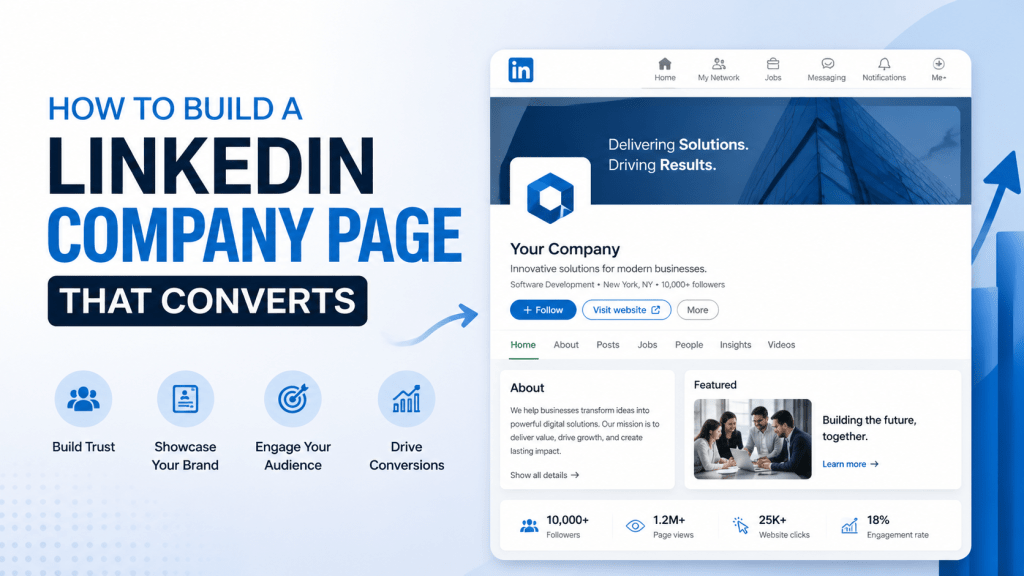
In today’s digital-first world, LinkedIn is not just a platform for job seekers and professionals to network—it has become a vital tool for businesses looking to build their brand, engage with customers, and generate leads. With over 900 million members worldwide, LinkedIn provides a unique opportunity for businesses to connect with their target audience on a professional level.
However, simply having a LinkedIn Company Page is not enough. In order to truly reap the benefits of LinkedIn, businesses need to optimize their pages to drive engagement, foster trust, and ultimately convert visitors into customers.
In this blog, we’ll walk you through how to build a LinkedIn Company Page that attracts attention, engages followers, and converts prospects into loyal clients.
Key Steps to Building a LinkedIn Company Page That Converts
1. Optimize Your Company Profile for Maximum Impact
Your LinkedIn Company Page serves as your brand’s first impression on LinkedIn—make it count. The profile details you provide can either capture the interest of potential clients or send them elsewhere.
Profile Picture and Banner
The first thing visitors will notice is your profile picture and banner image. Make sure your profile picture reflects your brand identity—this is usually your company logo. The banner image should complement your logo and offer a professional yet creative touch. It should align with your brand’s mission and help communicate your company’s values.
Tip: Use high-resolution images that fit perfectly within LinkedIn’s banner dimensions (1584 x 396 px). Avoid text-heavy images, as they can get cut off on different screen sizes.
Company Description
Your company description is a prime piece of real estate on your LinkedIn page. Use this space to clearly convey your business’s purpose and value proposition in a succinct and engaging manner. Make sure it’s not only informative but also optimized with relevant keywords. This will help your page show up in LinkedIn’s search results, making it easier for potential clients to find you.
Tip: Write your description in the first person. It should feel personal, approachable, and relatable while maintaining professionalism.
Contact Info and Call-to-Action (CTA)
Make it easy for visitors to connect with you by clearly listing your contact information. Add an email address, phone number, and links to your website and other social media channels.
Including a clear CTA on your LinkedIn profile is also crucial. It could be something as simple as “Contact Us,” “Learn More,” or “Request a Demo.” Your CTA should align with your business goals, whether that’s generating leads, driving traffic to your website, or promoting a new service or product.
2. Create a Compelling Content Strategy
The key to a successful LinkedIn Company Page is consistent, relevant, and valuable content. Creating a content strategy will ensure that your LinkedIn page not only attracts followers but keeps them engaged.
Types of Content to Post
LinkedIn is a platform where professionals and businesses go to learn, grow, and engage. To leverage this, post content that educates, informs, and builds thought leadership. Here’s the type of content you should consider posting:
- Industry News: Stay updated with the latest trends in your industry and share them with your audience. It positions your company as a knowledgeable leader in the field.
- Company Updates: Share behind-the-scenes looks at your company, team achievements, or product launches.
- Case Studies and Testimonials: These are powerful tools for social proof. Case studies show how your product or service solves real-world problems, while testimonials build credibility.
- Videos and Infographics: Visual content tends to engage users better. Post short, high-quality videos and easy-to-understand infographics that highlight important data or success stories.
Frequency of Posts
Consistency is key when it comes to LinkedIn content. Aim to post at least 3-4 times per week. This will keep your page active and ensure that you are consistently appearing in your followers’ feeds.
Tip: Use LinkedIn’s scheduling tool or third-party tools to schedule posts ahead of time, so you maintain consistency even during busy periods.
Engaging with Your Audience
Engagement isn’t just about posting content—it’s about building relationships. Respond to comments on your posts, share relevant content from other professionals, and participate in meaningful conversations. LinkedIn is a platform for dialogue, so make sure you’re interacting with your audience regularly.
3. Leverage LinkedIn’s Native Features for Enhanced Engagement
LinkedIn offers a variety of native features that can help increase engagement and drive conversions. These features are not just for individual profiles—they can be a goldmine for your company page.
Showcase Pages
Showcase Pages are an excellent way to create a dedicated space for specific products, services, or initiatives within your company. These pages allow businesses to tailor their messaging to distinct audience segments. For example, if you have multiple products or target different industries, a Showcase Page for each can help you engage more effectively with the right audience.
LinkedIn Groups
Participating in or creating LinkedIn Groups related to your industry or niche is another great way to engage. These groups provide a platform for sharing knowledge, asking questions, and building connections. By becoming an active participant, you can drive traffic to your company page and establish your brand as a thought leader.
LinkedIn Events
With LinkedIn Events, you can promote webinars, product launches, and conferences. This feature allows you to invite your followers, track RSVPs, and engage with attendees during and after the event. Events are also an excellent way to interact with your audience in real-time.
4. Targeting and Expanding Your Reach
LinkedIn’s advanced targeting capabilities make it one of the best platforms for reaching decision-makers in any industry. Here’s how to maximize your reach:
LinkedIn’s Audience Targeting Tools
LinkedIn allows you to target specific industries, job titles, company sizes, locations, and more. By using these targeting options, you can ensure your content is reaching the right audience.
Employee Advocacy
Encourage your employees to share content from your LinkedIn Company Page. This not only extends the reach of your posts but also helps to humanize your brand. When employees share posts, it can build trust and credibility in your company.
5. Track, Analyze, and Optimize
Success on LinkedIn doesn’t happen overnight—it requires continuous monitoring and adjustment. LinkedIn provides a host of analytics to help you track the performance of your page and content.
LinkedIn Analytics
Use LinkedIn’s built-in analytics to track key metrics like engagement rates, follower growth, and post performance. This data will help you understand what type of content resonates with your audience, and you can use these insights to refine your strategy.
A/B Testing
Experiment with different content formats, headlines, images, and CTAs. LinkedIn’s analytics can show you what works and what doesn’t, allowing you to continuously optimize your strategy.
6. Integrate Tagembed’s LinkedIn Feed Widget for Enhanced Engagement
One of the best ways to keep your LinkedIn Company Page active and engaging is by embedding your LinkedIn feed directly onto your website. This real-time feed shows your most recent LinkedIn posts, which adds fresh, dynamic content to your site. It also encourages visitors to follow your LinkedIn page and engage with your content directly on LinkedIn.
Why Embed LinkedIn Feeds on Your Website?
Embedding your LinkedIn feed on your website adds social proof and creates a more interactive user experience. It shows your audience that your company is active on LinkedIn and makes it easy for them to follow you for future updates.
How Tagembed Can Help:
Tagembed offers a simple solution for embedding your LinkedIn feed on your website. With its easy-to-use LinkedIn profile widget, you can display your most recent LinkedIn posts in real time, boosting engagement with website visitors. This integration not only keeps your site content fresh but also drives more traffic to your LinkedIn page, helping you build a stronger community and increase conversions.
7. Building Trust and Credibility
Trust is a critical factor in conversion. Visitors are more likely to engage with your brand if they feel confident in your expertise and reliability.
Customer Testimonials and Case Studies
Use testimonials and case studies to build trust. Share success stories from clients who have benefited from your products or services. This provides social proof that your business delivers on its promises.
Endorsements and Recommendations
LinkedIn allows employees and clients to leave recommendations on your company page. Encourage satisfied clients and employees to write these endorsements. Recommendations from credible sources will help solidify your company’s reputation.
8. Call-to-Action: Encourage Conversions
Every post, page, and interaction on LinkedIn should be driving toward a specific goal. Make sure your LinkedIn Company Page has clear calls-to-action (CTAs) that lead visitors down the path to conversion.
Driving Action on Your LinkedIn Page
Use strong, clear CTAs like “Request a Demo,” “Get in Touch,” or “Download Our Guide.” Make it easy for potential customers to take the next step with your company.
Incorporating Lead Generation Forms
LinkedIn’s lead generation forms make it easy for visitors to sign up for newsletters, free resources, or consultations directly on the platform. These forms allow you to capture qualified leads right from your Company Page.
Conclusion
Building a LinkedIn Company Page that converts is a continual process. By optimizing your profile, creating a compelling content strategy, leveraging LinkedIn’s native features, and tracking your performance, you can create a page that not only attracts visitors but converts them into loyal customers.
Remember, consistency is key. Optimize your profile, engage with your audience, and encourage employees to be brand advocates. With the right strategy in place, your LinkedIn Company Page can become a powerful tool in your business’s digital marketing arsenal.
Don’t forget to take advantage of tools like Tagembed to embed your LinkedIn feed directly on your website for even greater engagement and conversions.


Leave a comment