
If you’re looking for the easiest way to embed Google Reviews without an API key, the answer is simple: use a no-code Google Reviews widget. These tools let you display live Google Business reviews on your website without creating API credentials, writing code, or managing Google’s Places API. Simply connect your Google Business Profile, customize the widget, and copy the generated embed code to your website.
Displaying Google reviews widget for webiste helps build trust, showcase authentic customer experiences, and encourage more visitors to take action. Whether you run a local business, an online store, or a service-based website, adding Google reviews can improve your website’s credibility and increase conversions.
In this guide, you’ll learn how to embed Google reviews without an API key, explore different methods, understand their pros and cons, and discover the easiest no-code solution for adding an automatically updating Google Reviews widget to your website.
What Does It Mean to Embed Google Reviews Without an API Key?
Embedding Google reviews without an API key means displaying your business’s Google reviews on your website without manually connecting to the Google Places API or generating authentication credentials.
Instead of handling APIs, authentication, request limits, and maintenance, you use a tool that securely manages the technical connection in the background while giving you a ready-to-use review widget.
This approach is ideal for:
- Small businesses
- Local stores
- Restaurants
- Hotels
- Agencies
- Ecommerce brands
- SaaS companies
- Professionals
- Anyone without coding experience
Why Avoid Using Google API Keys?
Although Google offers APIs for developers, they aren’t the easiest option for most website owners.
Here are some common challenges:
| Using Google API | Without API Key |
| Requires developer setup | No technical skills required |
| API credentials required | Simple account connection |
| Maintenance required | Automatic updates |
| Request limits | Managed by the platform |
| Coding knowledge needed | Copy-paste embed code |
| Time-consuming | Setup in minutes |
Unless you’re building a custom application, using a no-code review widget is usually faster, easier, and more reliable.
Benefits of Embedding Google Reviews Without API
1. Quick Setup
Most no-code solutions let you publish reviews within minutes instead of spending hours configuring APIs.
2. No Coding Required
You don’t need HTML, JavaScript, or backend development experience.
3. Automatic Review Updates
Whenever customers leave new Google reviews, they automatically appear on your website.
4. Better Social Proof
Fresh customer reviews increase trust and reduce purchase hesitation.
5. Higher Conversion Rates
Displaying authentic customer experiences helps visitors make buying decisions faster.
6. Professional Design
Modern review widgets offer layouts that match your website without requiring design work.
Watch Video: How to Add Google Reviews on a Website
Adding Google Reviews to your website is easier when you can follow the process visually. This tutorial walks through the key steps for setting up and embedding Google Reviews, so you can see how the process works from start to finish.
Ways to Embed Google Reviews Without an API Key
There are several ways to display reviews without manually using Google’s API.
Method 1: Use a Google Reviews Widget (Recommended)
This is the easiest and most popular method.
Review widget platforms connect with Google on your behalf and generate an embed code you simply paste into your website.
Typical process:
- Connect your Google Business Profile
- Import reviews
- Customize the widget
- Copy the embed code
- Paste it into your website
That’s it.
Most website builders including:
- WordPress
- Shopify
- Wix
- Squarespace
- Webflow
- HTML websites
- Elementor
- BigCommerce
support this method.
Method 2: Manually Copy Reviews
You can manually copy review text and add it to your website.
While this doesn’t require an API, it comes with limitations:
- Reviews don’t update automatically
- Time-consuming
- Difficult to maintain
- May become outdated
This method is only practical if you have very few reviews.
Method 3: Screenshot Reviews
Some businesses display screenshots of Google reviews.
Although simple, screenshots have drawbacks:
- Not searchable by Google
- Not responsive
- Hard to update
- Can reduce website accessibility
- Doesn’t look professional
Best Way to Embed Google Reviews Without API Key
For most businesses, using a dedicated Google Reviews widget offers the best balance of simplicity, automation, and customization.
A good widget allows you to:
- Automatically collect Google reviews
- Display only selected reviews
- Match your brand colors
- Choose from multiple layouts
- Update reviews automatically
- Add review badges and star ratings
- Publish anywhere using one embed code
How to Embed Google Reviews Without API Using Taggbox
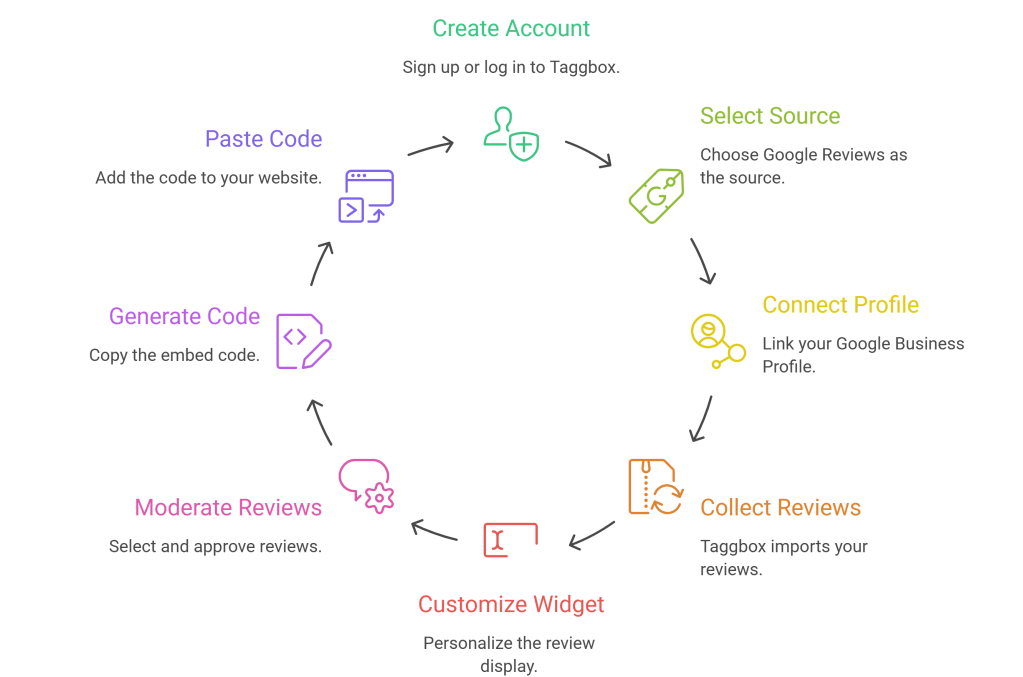
If you’re looking for a no-code solution, Taggbox provides one of the easiest ways to embed Google reviews without handling API credentials yourself.
Here’s how it works.
Step 1: Create Your Taggbox Account
Sign up or log in to your Taggbox account.
Step 2: Select Google Reviews
Choose Google Reviews as your review source.
Step 3: Connect Your Google Business Profile
Search for your business and connect it securely.
No API setup is required from your side.
Step 4: Collect Your Reviews
Taggbox imports your reviews into your dashboard.
Step 5: Customize the Widget
You can personalize:
- Layout
- Themes
- Colors
- Fonts
- Card styles
- CTA buttons
- Review display
- Star ratings
Step 6: Moderate Reviews
Choose which reviews appear on your website.
Hide:
- Spam
- Irrelevant reviews
- Duplicate reviews
Highlight your best customer experiences.
Step 7: Generate Embed Code
Copy the generated code.
Step 8: Paste It on Your Website
Paste the code into:
- WordPress
- Shopify
- Wix
- Squarespace
- Webflow
- HTML
- Elementor
- BigCommerce
Your Google Reviews widget is now live.
Features to Look for in a Google Reviews Widget
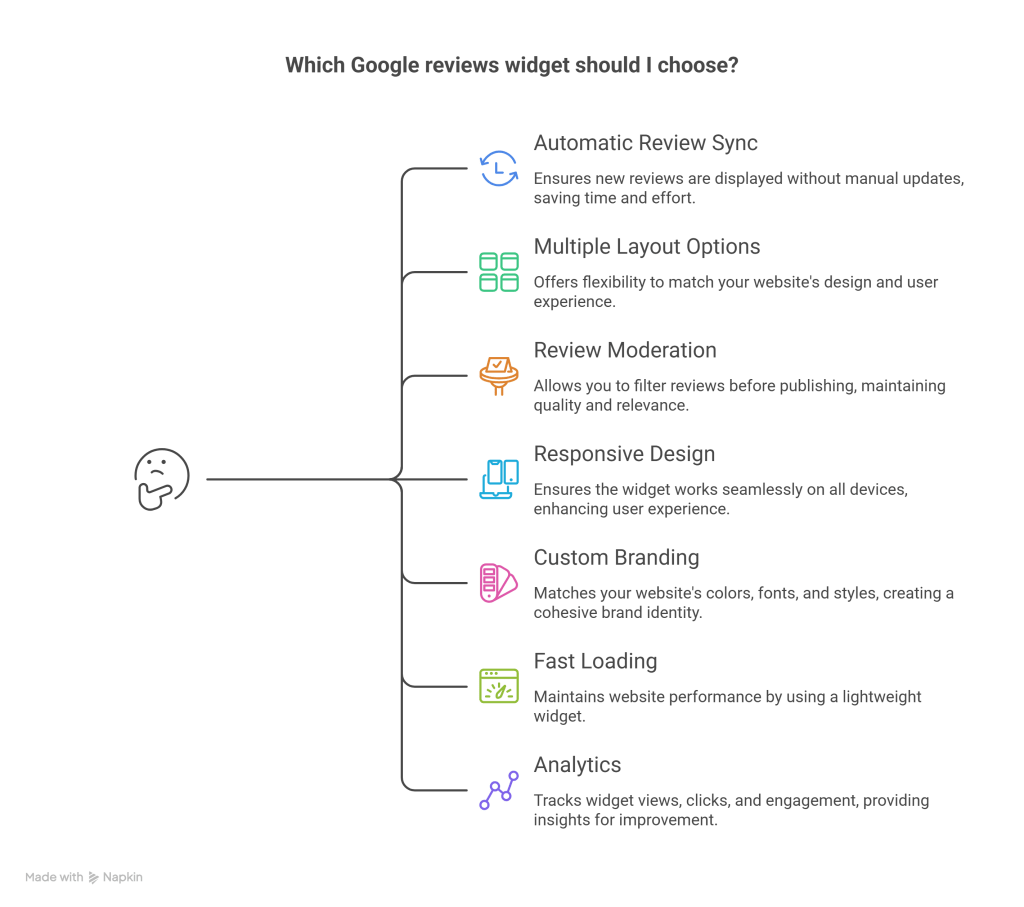
Not every review widget offers the same capabilities.
When choosing one, consider these features.
Automatic Review Sync
New reviews should appear without manual updates.
Multiple Layout Options
Look for:
- Grid
- Carousel
- Masonry
- Slider
- Badge
- List
- Sidebar
- Popup
Review Moderation
Filter reviews before publishing.
Responsive Design
Widgets should work across desktop, tablet, and mobile devices.
Custom Branding
Match:
- Colors
- Fonts
- Backgrounds
- Buttons
- Card styles
Fast Loading
A lightweight widget helps maintain website performance.
Analytics
Track:
- Widget views
- Clicks
- Engagement
- Visitor interactions
Does Embedding Google Reviews Without an API Affect SEO?
Indirectly, yes.
Displaying Google reviews on your website can contribute to a stronger user experience and trust, which are important for SEO.
Potential benefits include:
- Increased visitor trust
- Longer time on page
- Higher engagement
- Better conversion rates
- Fresh user-generated content (depending on how the widget is implemented)
Keep in mind that not all embedded review widgets are crawlable by search engines. If SEO is a priority, choose a solution that follows Google’s guidelines and offers SEO-friendly rendering where applicable.
Common Mistakes to Avoid
Using Outdated Reviews
Regularly updating reviews keeps your website relevant.
Showing Every Review
Feature your most relevant and helpful reviews instead of displaying everything.
Ignoring Mobile Experience
Always preview the widget on different screen sizes.
Poor Placement
Place reviews where they influence decisions, such as:
- Homepage
- Product pages
- Service pages
- Pricing page
- Checkout page
- Landing pages
Not Customizing the Widget
A branded review widget blends naturally with your website and looks more trustworthy.
Who Should Use Google Reviews Widgets?
Embedding Google reviews without an API key is suitable for almost every industry, including:
- Local businesses
- Restaurants
- Hotels
- Healthcare providers
- Realtors
- Educational institutes
- SaaS companies
- Ecommerce stores
- Digital agencies
- Consultants
- Fitness centers
- Salons
- Automotive businesses
FAQs
Can I embed Google Reviews without using the Google API?
Yes. Many no-code Google Reviews widget platforms let you display reviews without manually creating or managing a Google API key.
Is an API key required to display Google reviews?
Not necessarily. If you use a review widget platform like Taggbox, the platform handles the technical integration, allowing you to embed reviews without generating your own API credentials.
Is embedding Google Reviews free?
Some platforms offer free plans with basic features, while advanced customization, moderation, analytics, and branding options are typically available in paid plans.
Will new Google reviews update automatically?
If you’re using a review widget with automatic syncing, new reviews can appear on your website without manual updates.
Can I embed Google Reviews on WordPress without an API?
Yes. Most Google Reviews widgets support WordPress with a simple copy-and-paste embed code, eliminating the need for API setup.
Can I add Google Reviews to Shopify, Wix, or Squarespace?
Yes. Most no-code review widgets are compatible with Shopify, Wix, Squarespace, Webflow, HTML websites, Elementor, and other popular website builders.
Conclusion
Embedding Google reviews without an API key has become the preferred approach for businesses that want to showcase authentic customer feedback without dealing with complex technical setup. Whether you manage a local business, an online store, or a service-based website, a no-code Google Reviews widget lets you publish and maintain reviews with minimal effort.
If you’re looking for a solution that combines easy setup with customization, moderation, and automatic review updates, platforms like Taggbox simplify the entire process. Instead of spending time configuring APIs, you can focus on what matters most—building trust with potential customers through real customer experiences.


Leave a Reply